Monday, 3 March 2014

SQL Server performance

SQL Server performance

Posted By : Shailendra Chauhan, 27 Aug 2012
Updated On : 18 Oct 2013
  Version Support : SQL Server 2005,2008,2012
Keywords : sql server best practice, tips to improve sql query performance, tips for good database design, sql server optimization techniques, tips for sql query optimization
Best performance is the main concern to develop a successful application. Like a coin database is the tail side (back-end) of an application. A good database design provides best performance during data manipulation which results into the best performance of an application.
During database designing and data manipulation we should consider the following key points:
  1. Choose Appropriate Data Type

    Choose appropriate SQL Data Type to store your data since it also helps in to improve the query performance. Example: To store strings use varchar in place of text data type since varchar performs better than text. Use text data type, whenever you required storing of large text data (more than 8000 characters). Up to 8000 characters data you can store in varchar.
  2. Avoid nchar and nvarchar

    Practice to avoid nchar and nvarchar data type since both the data types takes just double memory as char and varchar. Use nchar and nvarchar when you required to store Unicode (16-bit characters) data like as Hindi, Chinese characters etc.
  3. Avoid NULL in fixed-length field

    Practice to avoid the insertion of NULL values in the fixed-length (char) field. Since, NULL takes the same space as desired input value for that field. In case of requirement of NULL, use variable-length (varchar) field that takes less space for NULL.
  4. Avoid * in SELECT statement

    Practice to avoid * in Select statement since SQL Server converts the * to columns name before query execution. One more thing, instead of querying all columns by using * in select statement, give the name of columns which you required.
    1. -- Avoid
    2. SELECT * FROM tblName
    3. --Best practice
    4. SELECT col1,col2,col3 FROM tblName
  5. Use EXISTS instead of IN

    Practice to use EXISTS to check existence instead of IN since EXISTS is faster than IN.
    1. -- Avoid
    2. SELECT Name,Price FROM tblProduct
    3. where ProductID IN (Select distinct ProductID from tblOrder)
    4. --Best practice
    5. SELECT Name,Price FROM tblProduct
    6. where ProductID EXISTS (Select distinct ProductID from tblOrder)
  6. Avoid Having Clause

    Practice to avoid Having Clause since it acts as filter over selected rows. Having clause is required if you further wish to filter the result of an aggregations. Don't use HAVING clause for any other purpose.
  7. Create Clustered and Non-Clustered Indexes

    Practice to create clustered and non clustered index since indexes helps in to access data fastly. But be careful, more indexes on a tables will slow the INSERT,UPDATE,DELETE operations. Hence try to keep small no of indexes on a table.
  8. Keep clustered index small

    Practice to keep clustered index as much as possible since the fields used in clustered index may also used in nonclustered index and data in the database is also stored in the order of clustered index. Hence a large clustered index on a table with a large number of rows increase the size significantly. Please refer the article Effective Clustered Indexes
  9. Avoid Cursors

    Practice to avoid cursor since cursor are very slow in performance. Always try to use SQL Server cursor alternative. Please refer the article Cursor Alternative.
  10. Use Table variable inplace of Temp table

    Practice to use Table varible in place of Temp table since Temp table resides in the TempDb database. Hence use of Temp tables required interaction with TempDb database that is a little bit time taking task.
  11. Use UNION ALL inplace of UNION

    Practice to use UNION ALL in place of UNION since it is faster than UNION as it doesn't sort the result set for distinguished values.
  12. Use Schema name before SQL objects name

    Practice to use schema name before SQL object name followed by "." since it helps the SQL Server for finding that object in a specific schema. As a result performance is best.
    1. --Here dbo is schema name
    2. SELECT col1,col2 from dbo.tblName
    3. -- Avoid
    4. SELECT col1,col2 from tblName
  13. Keep Transaction small

    Practice to keep transaction as small as possible since transaction lock the processing tables data during its life. Some times long transaction may results into deadlocks. Please refer the article SQL Server Transactions Management
  14. SET NOCOUNT ON

    Practice to set NOCOUNT ON since SQL Server returns number of rows effected by SELECT,INSERT,UPDATE and DELETE statement. We can stop this by setting NOCOUNT ON like as:
    1. CREATE PROCEDURE dbo.MyTestProc
    2. AS
    3. SET NOCOUNT ON
    4. BEGIN
    5. .
    6. .
    7. END
  15. Use TRY-Catch

    Practice to use TRY-CATCH for handling errors in T-SQL statements. Sometimes an error in a running transaction may cause deadlock if you have no handle error by using TRY-CATCH. Please refer the article Exception Handling by TRY…CATCH
  16. Use Stored Procedure for frequently used data and more complex queries

    Practice to create stored procedure for quaery that is required to access data frequently. We also created stored procedure for resolving more complex task.
  17. Avoid prefix "sp_" with user defined stored procedure name

    Practice to avoid prefix "sp_" with user defined stored procedure name since system defined stored procedure name starts with prefix "sp_". Hence SQL server first search the user defined procedure in the master database and after that in the current session database. This is time consuming and may give unexcepted result if system defined stored procedure have the same name as your defined procedure.

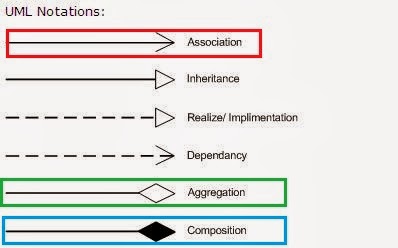
Difference among Association, Aggregation and Composition


What is the use of Association, Aggregation and Composition


Association

Association is a relationship where all object have their own lifecycle and there is no owner. Let’s take an example of Teacher and Student. Multiple students can associate with single teacher and single student can associate with multiple teachers but there is no ownership between the objects and both have their own lifecycle. Both can create and delete independently.

Aggregation

Aggregation is a specialize form of Association where all object have their own lifecycle but there is ownership and child object can not belongs to another parent object. Let’s take an example of Department and teacher. A single teacher can not belongs to multiple departments, but if we delete the department teacher object will not destroy. We can think about “has-a” relationship.

Composition

Composition is again specialize form of Aggregation and we can call this as a “death” relationship. It is a strong type of Aggregation. Child object dose not have their lifecycle and if parent object deletes all child object will also be deleted. Let’s take again an example of relationship between House and rooms. House can contain multiple rooms there is no independent life of room and any room can not belongs to two different house if we delete the house room will automatically delete.

Difference between aggregation and composition

Composition is more restrictive. When there is a composition between two objects, the composed object cannot exist without the other object. This restriction is not there in aggregation. Though one object can contain the other object, there is no condition that the composed object must exist. The existence of the composed object is entirely optional. In both aggregation and composition, direction is must. The direction specifies, which object contains the other object.

Example: A Library contains students and books. Relationship between library and student is aggregation. Relationship between library and book is composition. A student can exist without a library and therefore it is aggregation. A book cannot exist without a library and therefore its a composition. For easy understanding I am picking this example. Don’t go deeper into example and justify relationships!

https://blogger.googleusercontent.com/img/b/R29vZ2xl/AVvXsEhOvQgToYGzt8JUjGx4c42Y-MKMDw-cyIKPLEXel3dxhlWgjSzG4DrCDDGemfMX0N7SCquoqiBdk-MDpJ8xlnw_JYnUX7xaeMbwaHxu7vJes-GUNvea4fzLFLhXCZvsp6cEno7R2s4TKoBb/s1600/Association,+Composition+UML.JPG

Difference between object oriented and object based languages


Difference between object oriented and object based languages

Object oriented language
  1. Object-oriented language supports all the features of OOPs.
  2. Object-oriented language doesn't has in-built object.
  3. Object-oriented languages are C++, C#, Java etc.
Object based language
  1. Object-based language doesn't support all the features of OOPs like Polymorphism and Inheritance
  2. Object-based language has in-built object like javascript has window object.
  3. Object-based languages are Javascript, VB etc.

Difference Between Generalization and Specialization


Difference Between Generalization and Specialization

Keywords : generalization and specialization with example, understanding generalization and specialization
The process of extracting common characteristics from two or more classes and combining them into a generalized superclass, is called Generalization. The common characteristics can be attributes or methods. Generalization is represented by a triangle followed by a line.

Specialization is the reverse process of Generalization means creating new sub classes from an existing class.
Let’s take an example of Bank Account; A Bank Account is of two types – Current Account and Saving Account. Current Account and Saving Account inherits the common/ generalized properties like Account Number, Account Balance etc. from a Bank Account and also have their own specialized properties like interest rate etc.


Sunday, 2 March 2014

SQL KEYS DIFFERENCE


Types of SQL Keys
We have following types of keys in SQL which are used to fetch records from tables and to make relationship among tables or views.
Super Key
Super key is a set of one or more than one keys that can be used to identify a record uniquely in a table.Example : Primary key, Unique key, Alternate key are subset of Super Keys.
Candidate Key
A Candidate Key is a set of one or more fields/columns that can identify a record uniquely in a table. There can be multiple Candidate Keys in one table. Each Candidate Key can work as Primary Key.
Example: In below diagram ID, RollNo and EnrollNo are Candidate Keys since all these three fields can be work as Primary Key.
Primary Key
Primary key is a set of one or more fields/columns of a table that uniquely identify a record in database table. It cannot accept null, duplicate values. Only one Candidate Key can be Primary Key.
Alternate key
A Alternate key is a key that can be work as a primary key. Basically it is a candidate key that currently is not primary key.
Example: In below diagram RollNo and EnrollNo becomes Alternate Keys when we define ID as Primary Key.
Composite/Compound Key
Composite Key is a combination of more than one fields/columns of a table. It can be a Candidate key, Primary key.
Unique Key
Uniquekey is a set of one or more fields/columns of a table that uniquely identify a record in database table. It is like Primary key but it can accept only one null value and it can not have duplicate values. For more help refer the article Difference between primary key and unique key.
 Foreign Key
Foreign Key is a field in database table that is Primary key in another table. It can accept multiple null, duplicate values. For more help refer the article Difference between primary key and foreign key.
Example : We can have a DeptID column in the Employee table which is pointing to DeptID column in a department table where it a primary key.
Defined Keys -
 CREATE TABLE Department
(
 DeptID int PRIMARY KEY,
 Name varchar (50) NOT NULL,
 Address varchar (200) NOT NULL, )
CREATE TABLE Student
(
 ID int PRIMARY KEY,
 RollNo varchar(10) NOT NULL,
 Name varchar(50) NOT NULL,
 EnrollNo varchar(50) UNIQUE,
 Address varchar(200) NOT NULL,
 DeptID int FOREIGN KEY REFERENCES Department(DeptID)
)

Surrogate Key

Surrogate keys are keys that have no business  meaning and are solely used to identify a record in the table.

Such keys are either database generated (example: Identity in SQL Server, Sequence in Oracle, Sequence/Identity in DB2 UDB etc.) or system generated values (like generated via a table in the schema).

Friday, 15 November 2013

Magic Table


Magic Table in SQL

While using triggers these Inserted & Deleted tables
(called as magic tables) will be created automatically.

When we insert any record then that record will be added
into this Inserted table initially, similarly while
updating a record a new entry will be inserted into
Inserted table & old value will be inserted into Deleted
table.

In the case of deletion of a record then it will insert
that record in the Deleted table